![Agri - Icon 2024 - Orange-1.png]](https://support.30mhz.com/hs-fs/hubfs/Agri%20-%20Icon%202024%20-%20Orange-1.png?height=30&name=Agri%20-%20Icon%202024%20-%20Orange-1.png)
Until now, day and night always followed sunrise and sunset. With fixed hours you choose the times yourself, for example day from 05:00 to 21:00, to match your lighting or climate strategy.
You set these hours once per Site (your greenhouse location). The platform then uses them in three places:
- Charts: the grey night shading follows your hours.
- Widgets: day and night averages are calculated with your hours.
- Cultivations: your hours are the default start and end times when you turn on Night Targets.
How to set your day and night hours
Step 1: Open Organization settings
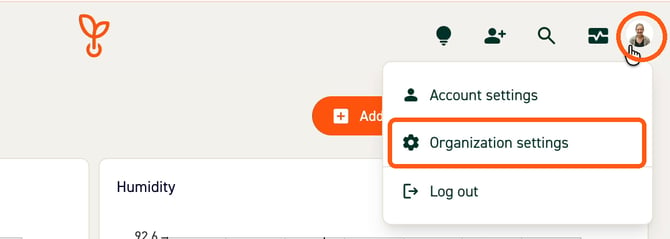
Click your profile picture in the top right corner. Then click Organization settings.
Step 2: Go to Sites
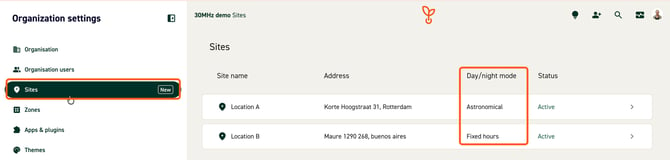
In the menu on the left, click Sites. You now see all your Sites. The column Day/night mode shows what each Site uses now: Astronomical (sunrise and sunset) or Fixed hours.
Click the Site you want to change.
Step 3: Choose Fixed hours
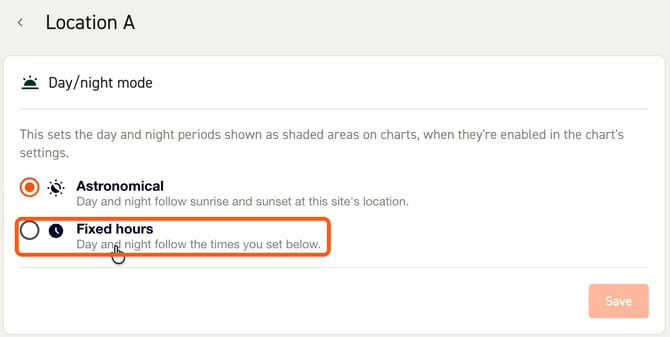
At the top of the page you see the Day/night mode box. Click Fixed hours.
Step 4: Fill in your times and save
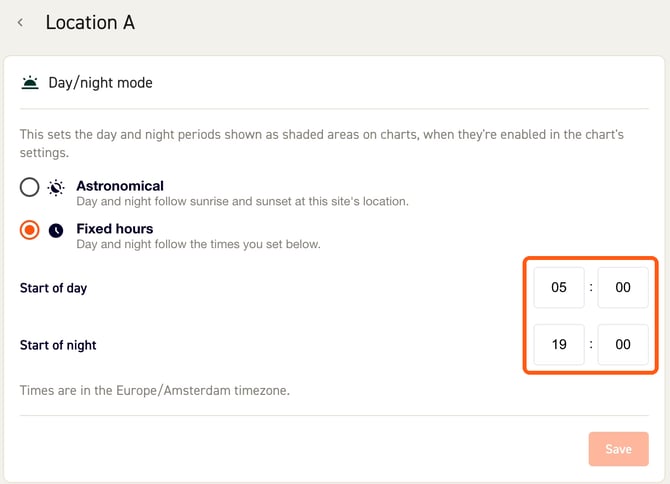
Two time fields appear:
- Start of day: the time your day starts, for example 05:00.
- Start of night: the time your night starts, for example 19:00.
Use the 24-hour clock. The times are in the time zone of your Site, which is shown under the fields.
Click Save. You see the message Site day/night mode saved in the bottom right corner. Done!
What changes when you use fixed hours
Night shading in your charts
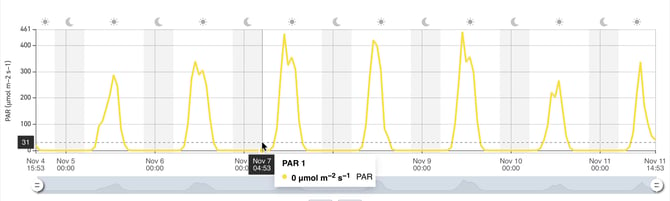
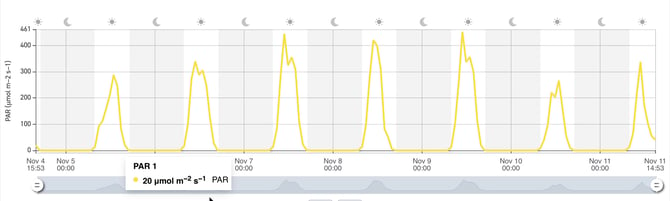
In line charts, night is shown as a grey band, with a sun and moon above the chart. With fixed hours, these grey bands follow your own times instead of sunset and sunrise.
In the example below, the Site first used fixed hours (day from 05:00 to 21:00). The night bands are narrow.
After switching back to astronomical hours, the night bands are wider. That's because in November the sun sets early and rises late.
Day and night values in widgets
Some widgets can show a value for the day only or for the night only, such as the average day temperature or average night temperature. With fixed hours, the platform uses your times to decide which measurements count as day and which count as night.
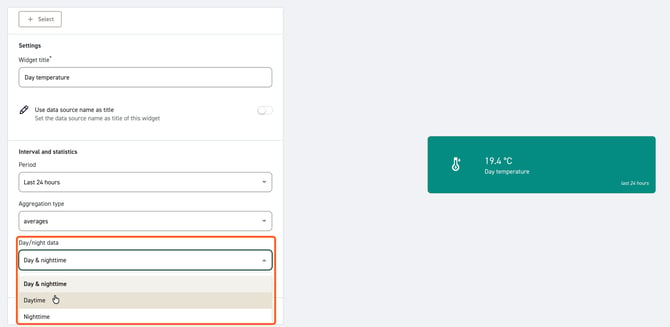
To set this up in a widget:
- Click Add widget on your dashboard and choose a widget type, for example Single value.
- Select your data source, for example air temperature.
- Under Period, choose at least 24 hours, for example Last 24 hours.
- Under Aggregation type, choose for example averages.
- Under Day/night data, choose Daytime or Nighttime.
- Click Create.
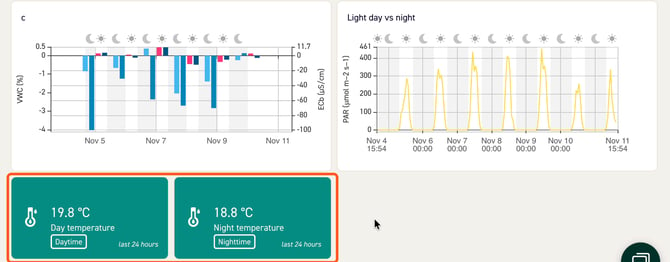
Tip: Make two widgets next to each other, one for Daytime and one for Nighttime. Then you can compare your day and night temperature at a glance.
The widget shows a small Daytime or Nighttime label, so you always know which value you are looking at.
Night Targets in Cultivations
When you turn on Night Targets in a cultivation, the platform fills in the start and end of the night for you based on the sunrise and sunset of your location. With fixed hours, it uses the times you set for the Site. You can still change them per cultivation.
Switch back to sunrise and sunset
Want day and night to follow the sun again? Go to Organization settings > Sites, click your Site, choose Astronomical and click Save. Your charts and widgets update right away.
Good to know
- Which Site does my data belong to? A sensor reading follows the Site where most of its data sources are. So if most of the data sources in a chart are in Location A, the chart uses the day and night hours of Location A.
- No day/night option in my widget? Set the Period to at least 24 hours. In line charts, also set the interval to at least 1 day.
- No grey night shading in my chart? The shading only shows when day/night is turned on in the chart's settings.
- Different hours for different greenhouses? Yes. Each Site has its own setting, so one Site can use fixed hours while another follows sunrise and sunset.
- Different hours for different sensors? As long as these sensors belong to different sites. If not it's currently not possible to set different hours. Let us know via support@30mhz.com that your interested in setting day/night hours for specific sensors, zones or anything else. We're open for new ideas to build next.